|
Overview
Although
PDF is probably the most popular, widely used and pervasive
file formats on the Internet nowadays, it is not supported
by most browsers, not easy to edit and requires additional
software like PDF reader to view it. Free PDF to
Word/Excel/JPG/TIFF/HTML Converter comes with a
serial of tools to make viewing and editing PDF
easier.
This
free PDF converter software can
convert PDF to Word & PDF to Excel while keeping
the original data and structural integrity intact, like
original text layout, images, headers/footers, bookmarks/hyperlinks,
table formatting, etc.; It also supports converting
PDF to TIFF for printout & fax; The ability
to convert PDF to JPG enables you to share
them in your Facebook or view them in ACDsee; What's more,
it can convert PDF to HTML so that it can
be viewed as web page in your browser.
|
|
|
|
1-Stop PDF Solutions
If you are looking
for different kinds of PDF conversion software to
deal with PDF documents, Free PDF to Word/Excel/JPG/TIFF/HTML
Converter should be the first option you consider.
It provides all-round free PDF solutions for conversion
issues: PDF to Word, PDF to Excel, PDF to JPG, PDF
to TIFF, PDF to HTML and more. Just one download
to solve all your PDF conversion problems and make
them easier to view and distribute.
 How
to Convert PDF to Word/Excel/JPG/TIFF/HTML?
How
to Convert PDF to Word/Excel/JPG/TIFF/HTML?
|
|
|
PDF to Word
Free PDF to Word/Excel/JPG/TIFF/HTML
Converter is able to convert your PDF files into
Word documents that allow you to read them in your
office software, edit, annotate, underline, take
notes and get high resolution suitable for printing.
The perfect document layout retention saves you
much effort in reformatting documents for editing
especially when you need to maintain the hyperlinks
headers/footers, bookmarks, tables and so forth.
You can also select only a part of the text to convert
from PDF to Word so that you won't have to convert
the whole document.
How to Convert PDF to Word?
|
|
|
PDF to Excel
Sometimes you may
need to convert your PDF to Excel due to the non-editable
nature of the PDF itself. Using Free PDF to Word/Excel/JPG/TIFF/HTML
Converter is the most efficient way to recreate
your form in editable format, change the numbers,
calculate data with formula and manage them in Microsoft
Excel. You don't need to worry about losing the
table, content or any layout, in any case.
How to Convert PDF to Excel?
|
|
|
PDF to JPG
Many PDF documents
are composed of images, like drawing, photo, chart,
image, etc. that you may want to use in other applications
instead of PDF viewer. Free PDF to Word/Excel/JPG/TIFF/HTML
Converter allows you to convert PDF to JPG, PNG,
GIF, BMP and more with customizable DPI, color depth
and pen width. Now you can do some image manips,
share them online or simply view them in ACDsee.
How to Convert PDF to JPG?
|
|
|
PDF to TIFF
If you work for a
company that uses e-faxing, you may need to convert
PDF documents to the TIFF format for printout &
fax. Free PDF to Word/Excel/JPG/TIFF/HTML Converter
is a practical tool that can be applied on conversion
of any variations of PDF to TIFF formats. You can
adjust the output to meet you size and quality requirements.
How to Convert PDF to TIFF?
|
|
|
PDF to HTML
If you want to use
PDFs on your website, the best way is to convert
it to HTML files. Free PDF to Word/Excel/JPG/TIFF/HTML
Converter gives a PDF to HTML converter that can
convert PDF documents to HTML files, which can be
viewed as a webpage in your browsers. It supports
PDF to HTML conversion that is compatible with W3C
Website Compliance standards.
How to Convert PDF to HTML?
|
|
|
Layout Maintenance &
Top Quality
No matter what your
target formats are, Free PDF to Word/Excel/JPG/TIFF/HTML
Converter will keep the original layout of your
PDF formats. For Word & Excel output, the hyperlinks,
paragraphs, graphics and lots of others can be well
preserved while for image output like JPG, TIFF,
PNG, BMP & GIF, you are allowed to adjust the
DPI to make a proper choice to balance size and
quality.
|
|
|
Batch Conversion Mode
All PDF converters
included supports batch conversion, making it easy
to handle hundreds of PDF files. If you work for
a company with tons of PDF documents coming and
going every day, Free PDF to Word/Excel/JPG/TIFF/HTML
Converter should be the first choice.
|
|
|
No Acrobat Needed
Working with Free
PDF to Word/Excel/JPG/TIFF/HTML Converter requires
no Adobe Acrobat or any other third party PDF software
or browser plugins. It does the work solely to save
you the bother of finding and installing other tools.
|
|
|
Why
should I choose Free PDF to Word/Excel/JPG/TIFF/HTML
Converter
|
|
 Ease
of use Ease
of use
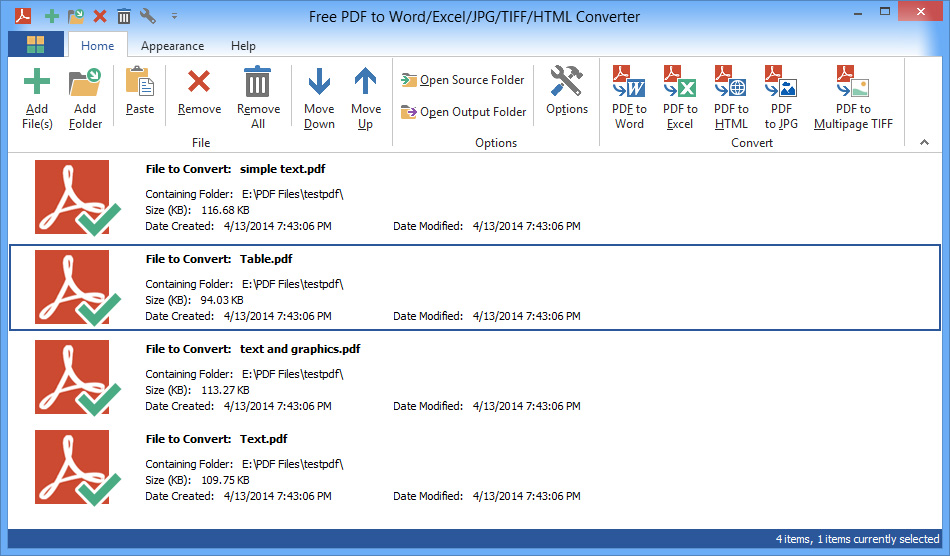
Free PDF to Word/Excel/JPG/TIFF/HTML Converter
is endowed with an intuitive interface and files
to be converted can be added to a waiting list.
The importation process can be made by simple drag-and-drop
or via the contextual menu. Once imported, you can
view the source directory, filename, the size and
modified/created date & time.
Free
with No Limitations
Free PDF to Word/Excel/JPG/TIFF/HTML Converter
is FREE to use, providing all the features you can
see on the interface without any kind of fee or
limitation. You can use it for casual or business
purposes.
No
More Online Conversion
You may have found some online PDF conversion
services, but to tell the truth, most of them are
worthless due to lacking of output control and techniques
to guarantee quality result. Free PDF to Word/Excel/JPG/TIFF/HTML
Converter gives all you need, without the need of
network connection.
Customizable
Appearance Settings
It allows you to change the display mode, style,
color, button size and a lot many settings of the
user interface. You can even customize the quick
access toolbar to add new buttons or remove unneeded
ones.
|
What
are the system requirements?
|
| |
Minimum:
Intel Pentium 3 500MHz or equivalent processor
At least 256 MB RAM
50 MB free hard disk space
Graphics mode 800x600, 16-bit color
Internet Explorer 6
Microsoft Windows XP / Vista / 7 / 8
Recommended:
Intel Pentium 4 1GHz or equivalent processor
512 MB RAM
Minimum 100 MB free hard disk space
Graphics mode 1024x768 true color (highest 32-bit)
Internet Explorer 7
Microsoft Windows XP / Vista / 7 / 8
|
|
 |
 |
Screenshots
|
 |
|
|
Free PDF Converter
|
|
|
Related Products
|
|
|
|





 Did
you know?
Did
you know?
